The technology I use for creating Digital Art-


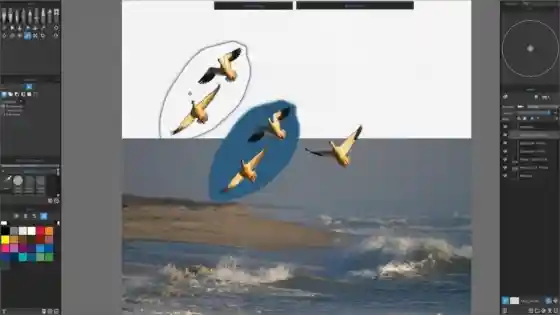
“Rebelle” is so powerful, I literally resculpted my PC workstation to take full advantage of the features. Escape Emotions has a huge investment in “Rebelle” and I believe it is the premiere digital painting application on the market today. If you desire to enter into a relationship with this serious digital tool, consider the on-going costs before you leap. Today, “Rebelle 8” costs about $150. This provides about a year of updates included. Although the application will continue to function after the year expires, you will no longer receive updates. When I started it was Rebelle 6, and then one year later I purchased Rebelle 7. I now run Rebelle 8, and I have re-purchased the application each time. I also have purchased digital papers and canvases which run between $25 to $45 per purchase. Realistically, budget “Rebelle” running you about $10 to $15 per month as you own and maintain the product.
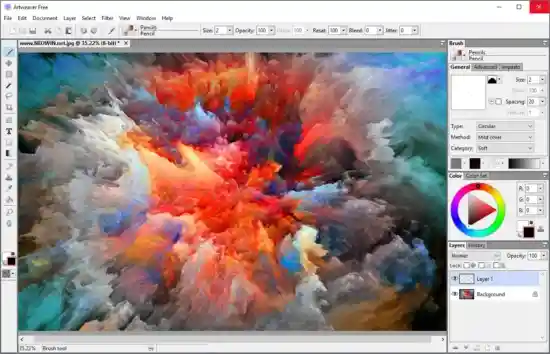
I use several other digital applications as well. I started out in my videography days with the Adobe Suite of products, but have determined they are too expensive in an on-going capacity. To replace the utilities of Adobe and enhance the usable features I wound up with a batch of new applications. The short list is “Artweaver Pro” which replaces the functionality of Adobe Photoshop. It is a German product made by Besware. It does 95% of what Photoshop does and costs $40.00 for a license. It has a free version if you want to try it. I recommend it. Not so much as a painting program, but rather as an image management tool. It is a great image reducer and a good image expander. It has limited filters and manipulation tools, but is a solid tool for the budget minded.
In that same regard, I also run DXO Photo Lab. Now this application is a legacy product for me from my videography and photography work. Much of my reproduction and art-repair work starts out as photographic images. Invariably, the images are not optimal for augmentation and repair in my other Art applications. DXO Photo Lab is a premiere product in this regard. Much better than Adobe Photoshop in my opinion – although I know some of you would disagree. Also, DXO Photo Lab is simply the best at enlargement and image reduction computational accuracy. The algorithms are just spot on to my eye.
Of course, utility comes at a price, and DXO Photo Lab runs about $240. You get a year of updates in the deal, and upgrading after the year runs about $120. Realistically, plan on $10 per month to use this tool going forward. More if you employ the NIK filters etc. If you plan on running all of your photography through the DXO mechanism, your photographic work will improve dramatically – and you can justify the costs associated with the privilege of the program. I am beginning to do underwater photography as an add to my portfolio and I know DXO Photo Lab will be a big plus in my work in this regard.
There are a few other odds and ends in the application end of my work. AI is becoming a reality in Digital Art, and I am evaluating several applications as I move forward. Much of my videography editing is now done in an AI domain, and literally I am talking to my (AI) video editor as my projects come together (or apart). I can imagine soon my Digital Art will soon follow this pattern… we will just have to wait and see!
In that my work is digitally created, I should talk a bit about my Desk Top Digital Work Station. It is a tower configuration. Here is my set-up today:
OS Name Microsoft Windows 11 Pro
Version 10.0.26200 Build 26200
OS Manufacturer Microsoft Corporation
System Name RICCLX
System Manufacturer CLX
System Model Custom for Richardhart.com
System Type x64-based PC
System SKU To Be Filled By O.E.M.
Processor AMD Ryzen 9 5950X 16-Core Processor, 3401 Mhz, 16 Core(s), 32 Logical Processor(s)
BIOS Version/Date American Megatrends Inc. P4.00, 4/15/2025
SMBIOS Version 3.2
Embedded Controller Version 255.255
BIOS Mode UEFI
BaseBoard Manufacturer ASRock
BaseBoard Product X570 Phantom 4
BaseBoard Version
Platform Role Desktop
Secure Boot State Off
PCR7 Configuration Elevation Required to View
Windows Directory C:\WINDOWS
System Directory C:\WINDOWS\system32
Boot Device \Device\HarddiskVolume2
Video Card: NVIDIA GEFORCE RTX3090
Locale United States
Hardware Abstraction Layer Version = "10.0.26100.1"
User Name RICCLX\XXX
Time Zone Hawaiian Standard Time
Installed Physical Memory (RAM) 64.0 GB
Total Physical Memory 63.9 GB
Available Physical Memory 49.5 GB
Total Virtual Memory 73.4 GB
Available Virtual Memory 49.7 GB

My workstation CPU (see right) also has a liquid cooled radiator for the CPU. I run the frame open with an external fan running on the hotspots because I live in Hawai’i and my studio has western exposure and gets the afternoon sun (and heat). With lots of graphics processing the NVIDIA video card runs hot and requires the room to be air conditioned for much of the year. To round out my visuals, I run three Dell 4K video monitors set to create on giant screen. I also run Air Parrot to port my computer video to any of the Apple TV boxes in our home. That way I can view my work in different light and settings to see if works outside of my computer. I will write more about presenting my work in a later overview.

In addition to my workstation, I run a XP Pen Artist Ultra 16 4K Tablet Computer on my desktop. I have two distinct stylus for these that I use in painting/coloring on the workstation. My Tablet set-up is paired to “Rebelle” for painting and essentially becomes my 4th computer monitor when employed. XP Pen Tablets require a different approach than the Apple iPad and it’s associated stylus. Again, the goal in “Rebelle” was to create a work environment that was similar to painting on an upright easel. Gravity matters here. Paints flow. That’s the good and the bad news. Suffice it to say, it is a process…
So that is a quick summation of my Digital Art tools. If I added it all up monetarily, it would be a big number financially. For most, Art is a fabulous way to make a small fortune (out of a larger one). Unless you have a method and plan to bring your Art to market, you are looking at another expensive hobby. The 10,000 hour rule applies here. Which means, if you are not acquainted with the axiom: that you can plan on about 10,000 hours of practice to attain a serious level of proficiency in most endeavors. For me, it has been worth every penny and every moment I have invested. My hands need to be busy and Art is a wonderful and healthy way to reveal my thinking and need to create as a hearing impaired person.

Lastly, I don’t create on canvas, paper, glass, or metal. I print to it. Most of my Art work is rendered in Giclee Printing on Fine Art Paper for framing and/or directly to Art Canvas. The costs of printing is a serious component and consideration in Digital Art creation. Traditional Artists must purchase and inventory their working media. If a completed piece does not find a new home, it can be repurposed or repainted (if canvas). Even though my Art is largely Digital I still have a large physical inventory of sketches and drawings to keep. My next project is to Digitize those also, and try to bring some order back to my Studio space.
Mahalo for your questions and an oppurtunity to serve!
Richard Hart - Digital Artist